

Introducing Pipelines in Biomni Lab
By the Phylo team
Agents, like scientists, may approach the same research question differently each time. That flexibility is useful for exploration but once an analysis is ready to share, publish or apply to new data, the method needs to be reusable.
A Pipeline is a defined sequence of computational steps, with specified inputs and settings. Pipelines connect agentic reasoning with deterministic execution. Instead of generating a new analysis from scratch each time, the agent works with a defined sequence of versioned scripts and computational steps. The agent can prepare inputs, configure and manage the run, troubleshoot failures, and interpret the outputs, while the underlying analysis remains consistent and reproducible.
Biomni agents can run existing Nextflow pipelines on new datasets. When no standard pipeline fits, agents can also help adapt an existing workflow, add specialized modules, or turn an exploratory analysis into a reusable Pipeline.
What this means for scientists:
- Computational biologists: Delegate pipeline setup, execution, monitoring, and troubleshooting to agents, and scale analyses across more datasets while retaining visibility into code, parameters, and execution.
- Bench scientists: Run sophisticated computational workflows themselves. Agents translate their data and scientific questions into configured Pipeline runs, manage the technical execution, and help them understand the results.
- Research leaders: Turn validated team workflows into reusable Pipelines that agents can apply across studies, extending computational expertise across the organization.
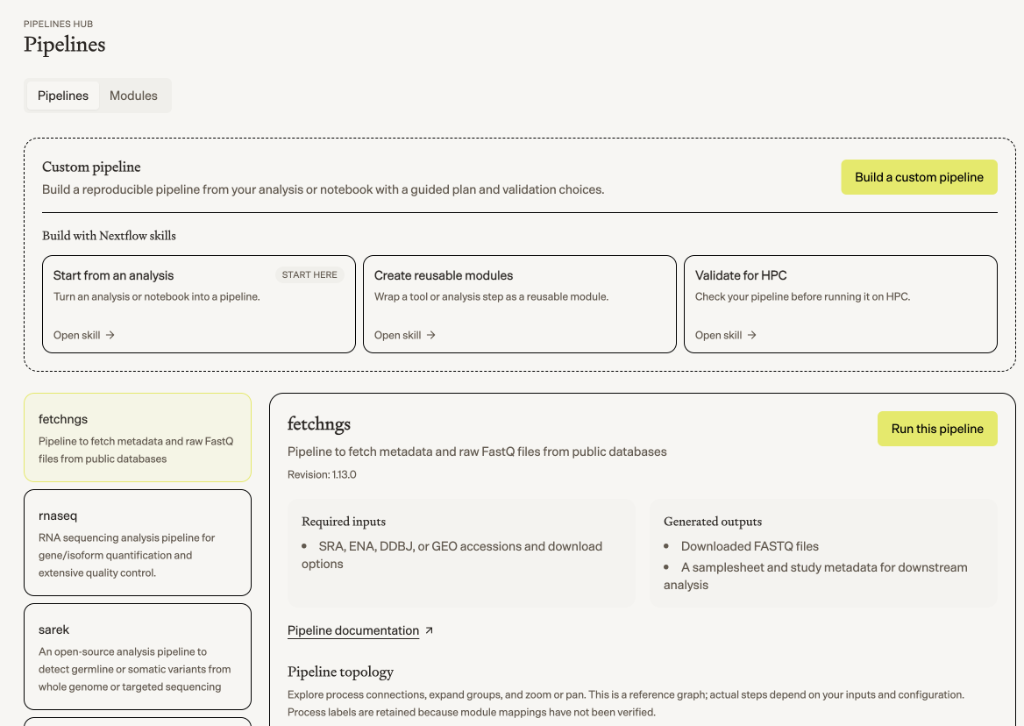
How Pipelines work
Pipelines are powered by Nextflow, an open-source workflow language widely used for reproducible scientific computing and developed and maintained by Seqera. Biomni Lab adds an agentic layer on top, giving agents the infrastructure to run, orchestrate, and build Nextflow Pipelines.
There are two main ways to use Pipelines in Biomni Lab.
1. Run an existing Pipeline on new data
Select a supported Pipeline, provide your dataset, and ask Biomni agents to run it.
Biomni agents prepare your data and inputs in the format required by the Pipeline, configure the run, provision and manage the compute, monitor execution, and troubleshoot errors along the way. When the Pipeline finishes, the agent reviews the outputs and returns the results in the same Biomni Lab session.
You can then continue working with the agent to ask follow-up questions, dig deeper into the results, or run additional analyses—all with the context of the Pipeline run available in the conversation.
Biomni Lab already supports nf-core community pipelines built with Nextflow, including:
- RNA-seq:
nf-core/rnaseqandnf-core/scrnaseq - Chromatin profiling:
nf-core/atacseqandnf-core/chipseq - Variant calling:
nf-core/sarek - Rare disease and cancer genomics:
nf-core/rarediseaseandnf-core/oncoanalyser - DNA methylation:
nf-core/methylseq - Nanopore sequencing:
nf-core/nanoseq - Sequencing-data retrieval:
nf-core/fetchngs
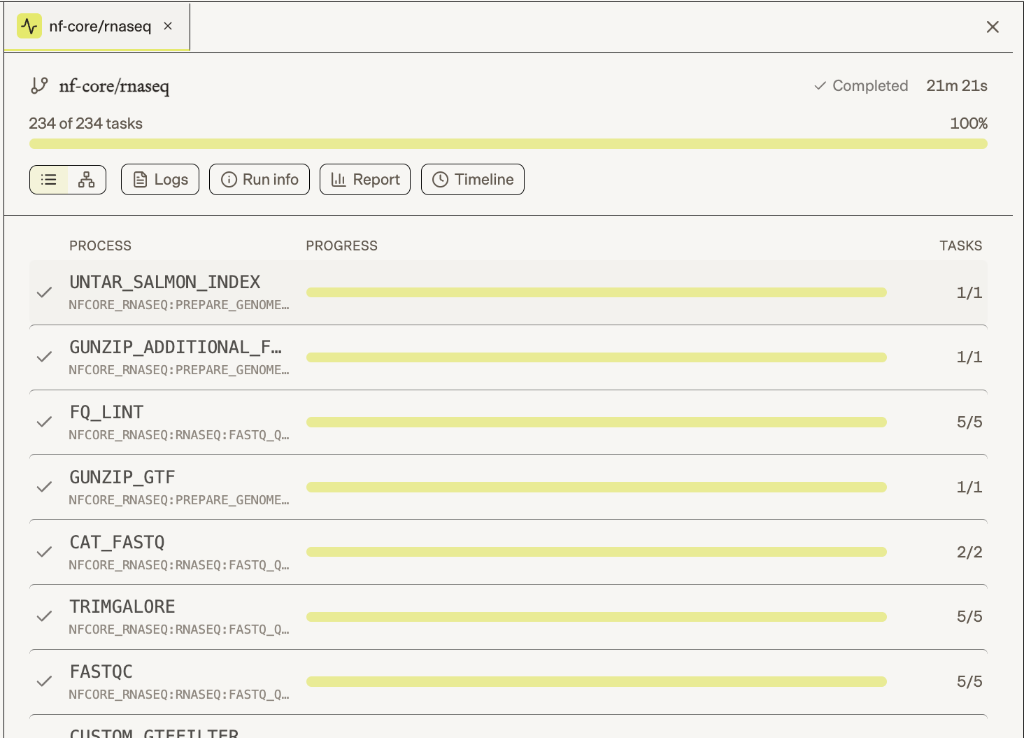
2. Turn an agent-driven analysis into a reusable Pipeline
Sometimes you start by working with a Biomni agent rather than an existing Pipeline. You might explore a dataset, try different analyses, and eventually arrive at a workflow you want to reuse.
In the same Biomni Lab session, add the relevant Nextflow skills and ask the agent to turn that analysis into a Pipeline. The agent helps package the steps, inputs, and parameters into a reusable Nextflow workflow that your team can review and validate.
Once created, the Pipeline can be run again on future datasets without rebuilding the analysis from scratch.
Biomni Lab’s Nextflow skills support this process, including nextflow-from-analysis for turning an analysis into a Pipeline, nextflow-module-author for creating reusable modules, and nextflow-hpc-validate for validating the Pipeline before broader use.
Looking ahead
Pipelines and free-form agent analysis serve different purposes. Pipelines are best for well-defined analyses that need to run consistently across datasets, while free-form agent analysis is better for exploratory work where the next step depends on what the agent finds.
Looking ahead, Pipelines can combine deterministic computation with agentic reasoning. A workflow might use a reproducible Pipeline for data processing, let an agent interpret intermediate results and decide what analysis to run next, then return to deterministic computation before an agent synthesizes the findings.
This creates a middle ground: the overall scientific workflow can have a defined, inspectable structure, while individual agentic steps remain adaptive. The goal is not to make every analysis deterministic, but to make each part of the scientific process as reproducible as it should be and as flexible as it needs to be.
Try Pipelines in Biomni Lab today.
Acknowledgment: Biomni Lab uses the open-source Nextflow workflow language, developed and maintained by Seqera and its contributor community, and supports Pipelines from the nf-core community. Phylo and Biomni Lab are independent products and are not affiliated with, sponsored by or endorsed by Seqera or nf-core.